Showing posts with label TFS. Show all posts

Friday, May 6, 2016

Remove TFS association from Microsoft Project file

Problem:

I was trying to build an MS project file for a new program we are starting.  I had built out my backlog in TFS.  I wanted to try out the MS project linking.  I ran into issues when I associated the file with the incorrect TFS collection.  There is no way to unlink in MS 2007!


Solution:


  1. Close Microsoft Project
  2. Right click on the mpp file and choose Properties.
  3. Choose the Custom tab in the Properties window.
  4. Choose any Property listed there named “VS  Team System Data Do Not Edit” and click Remove.
  5. Click Apply or Ok.
  6. Open the mpp file, and you will get a message saying its not associated with any TFS server. Click Ok and Save it.
  7. You will not get the error message every time you open the mpp file as long as you save it once after the message is received.


Source:

https://blogs.msdn.microsoft.com/buckh/2006/07/19/removing-the-team-foundation-server-association-in-microsoft-project-and-microsoft-excel-files/

Monday, March 28, 2016

Monday, March 30, 2015

Event 4656 - Map error TFS when adding new solution

I had created a new TFS Collection and was attempting to add my first solution to the new collection.
Each time I attempted to add the solution to the collection I kept getting errors.  I then tried to map the local drive for my workspace and go the Access to the path is denied.  I checked the logs on the TFS server and each time I got the error I logged a 4656. 

I started digging since VS output window gave me the location

C:\ProgramData\Microsoft Team Foundation Local Workspaces

I checked the permissions for this folder and discovered that my local sa account did not have access to the folder.  Each time I was attempting to add the code to TFS it goes to this local directory as the account you are logged in as.  Added my permissions and the problem was resolved.

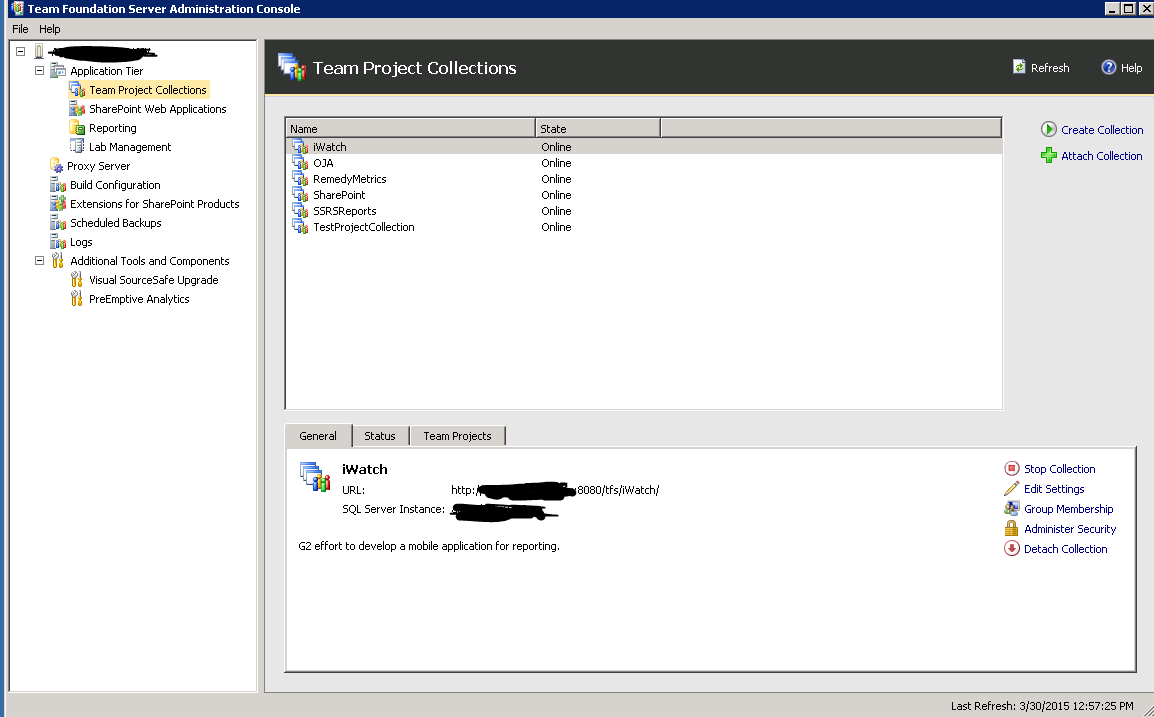
Team Foundation Server - How to add a new root project (Team Project Collection)

Remote into the TFS server
 
Select Application Tier > Team Project Collections
 On the right hand side, select the Create Collection icon
 
This starts the team project collection wizard