Showing posts with label boot to vhd. Show all posts

Tuesday, September 8, 2015

Enable Boot to VHD with Windows 10

Problem:


I am building out a development environment to run in the office.  I decided to update my vhd builds to windows 10 from Windows 8.1.  The last time I did this was with Imagex.  Things have moved on and now Imagex has been depreciated. The new tool is DISM and is part of the OS starting in Windows 8.

Solution:

  1. In your host OS, Create the VHD with disk management (See Technet article)
  2. Now the command to move the WIM image
    • DISM /Apply-Image /ImageFile:D:\Sources\install.wim /Index:1 /ApplyDir:V:\
      where D is the drive mounted with the windows 10 disk and V: is the vhd mount
  3. Change the boot menu to boot to vhd on your c drive.
    • bcdedit /copy {GUID} /d "New Name"
    • bcdedit /set {GUID} osdevice vhd=[C:]\folder\filename.vhd  
    • bcdedit /set {GUID} device vhd=[C:]\folder\filename.vhd
      • Note: I got tripped up on the exact syntax for bcdedit. The brackets around the drive letter are required. If you leave them off you will get a syntax error.
    • bcdedit /default {current}
    • bcdedit /set description "Windows 10 VHD"


Source:

  1. https://technet.microsoft.com/en-us/windows/dn858566.aspx
  2. http://mythoughtsonit.com/2013/02/dism-exe-replaces-imagex-exe/
  3. http://blogs.technet.com/b/jamesone/archive/2009/05/19/boot-from-vhd-the-joy-of-bcdedit-and-a-nice-hyper-v-gotcha-or-two.aspx

Saturday, October 4, 2014

Windows 10 Preview install on VHD


1. Download Windows 10 Preview from Microsoft preview site.  

2. Run disk management tool “diskmgmt.msc” to create blank vhd.

3. Select Action > Create VHD.

3. Once you have VHD file , use run disk management tool “diskmgmt.msc”.
4. Select “Attach VHD” option from the “Action” Menu.
5. “Select/Enter” path to VHD location
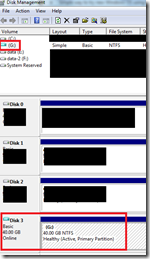
6. Windows will mount the VHD and assigns drive letter. Note down the drive lettter. In my case it is mount as “G” drive. Now from the explorer you can see the “G” drive.
7. Launch command prompt in “Administrator” mode

8. Now mount the Win 10 preview iso using disk management tool repeat step 4.

9. Use imagex tool to tranfer wim file onto your blank vhd.
imagex.exe /apply e:\win10\sources\install.wim 1 g:\ /verify

10. In “Administrator” mode, Type following command to make entry in the windows boot loader
c:\Windows\system32\bcdboot G:\Windows
Note: Replace “G” with the drive letter depending on you system where VHD is mounted.
11. Launch “msconfig.exe” from the “Administrator” command prompt to verify that new boot entry is added in the boot loader.
You can change the boot order from here.
Note: Replace “G” with the drive letter depending on you system where VHD is mounted
12. If you reboot the system, now you will have option to boot into new OS.